
implementation_plan.md 5.5 KB
Implementation Plan - AuraK External API Service (v2.0)
Provide an API service for external systems to access the KnowledgeBase functionalities, including chat, search, and document management.
User Review Required
[!IMPORTANT] Multi-Tenancy & Resource Sharing:
- Tenant Entity: We will introduce a
Tenant(Organization) entity.- Resource Scoping:
User,KnowledgeBase,KnowledgeGroup,SearchHistory,Note, andImportTaskwill be scoped bytenantId.- Configuration Hierarchy:
- ModelConfig: Inherited hierarchy:
System Models (Global)->Tenant Models (Shared in Org)->User Models (Private).- TenantSettings: New entity to define organization-wide defaults (Language, Default Models, Search thresholds).
UserSettingcan still override these for personalization.- Data Migration: Existing data will be migrated to a "Default Tenant" during the first run.
- Elasticsearch Isolation: The
tenantIdfield will be added to the ES mapping and enforced in all search/delete queries.- Storage Partitioning: Uploaded files will be stored in
uploads/{tenantId}/{fileId}to isolate files at the filesystem level.- API Key: Tied to
User, scoped byTenant.[!IMPORTANT] RBAC & Interface Separation:
- Roles:
SUPER_ADMIN: Manage Tenants and global system settings.TENANT_ADMIN: Manage Users and Knowledge Bases within their Tenant.USER: Access Chat, Search, and Knowledge Base within their Tenant.- API Separation: Administrative endpoints will be separated into
/api/v1/super-admin/*and/api/v1/admin/*.- UI Separation: Recommend separating the "Admin Portal" from the "User Workspace" to ensure a cleaner user experience and better security boundaries.
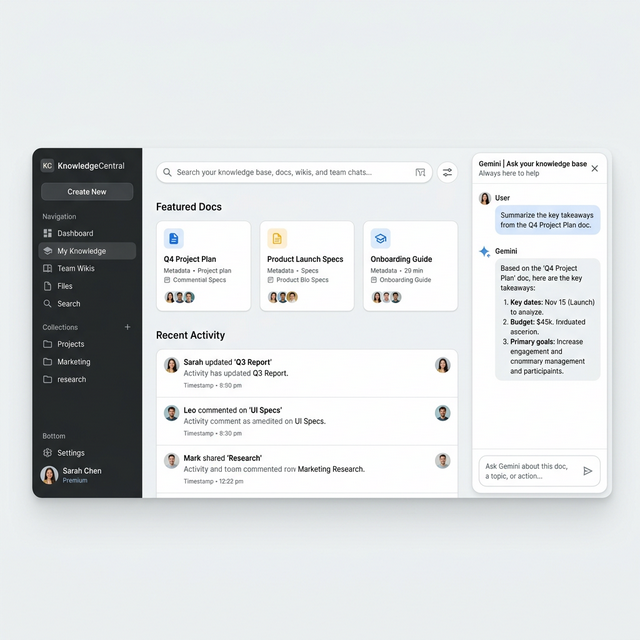
[!IMPORTANT] Frontend Modernization (Google Workspace Style):
- Design Aesthetic: Adopt a clean, modern, and professional style inspired by Google Workspace (Gmail, Drive, Gemini).
- Core Elements:
- Sleek Navigation Rail: A minimal, collapsible sidebar with rounded active states.
- Top Global Search: A prominent, rounded search bar for quick access.
- Airy Layout: Increased white space and soft shadows to improve readability.
- Gemini-like Chat: A modern AI chat interface with clean message bubbles and a refined input area.
- Mockup:
Proposed Changes
[Component] Database Schema
[NEW] tenant.entity.ts
- Define
Tenantentity withidandname.
[MODIFY] user.entity.ts
- Add
tenantIdcolumn (ManyToOne relationship withTenant). - Add
rolecolumn (Enum:SUPER_ADMIN,TENANT_ADMIN,USER). - Add
apiKeycolumn for API authentication.
[NEW] tenant-setting.entity.ts
- Store organization-wide defaults (similar fields to
UserSetting).
[MODIFY] model-config.entity.ts
- Add
tenantIdcolumn (nullable for global models). - Update lookup logic to include system-level and tenant-level models.
[MODIFY] knowledge-base.entity.ts
- Add
tenantIdcolumn.
[MODIFY] knowledge-group.entity.ts
- Add
tenantIdcolumn.
[MODIFY] search-history.entity.ts
- Add
tenantIdcolumn.
[MODIFY] note.entity.ts
- Add
tenantIdcolumn.
[Component] Infrastructure & Storage
[MODIFY] elasticsearch.service.ts
- Update
createIndexmapping to includetenantIdas akeywordfield. - Modify
searchSimilar,searchFullText, andhybridSearchto includeterm: { tenantId }filter.
[MODIFY] knowledge-base.service.ts
- Update file storage logic to use
uploads/{tenantId}/{fileId}path.
[NEW] [migrations]
- Create a migration script to:
- Create the
Tenanttable. - Create a "Default" tenant.
- Update all existing records to link to the "Default" tenant.
- Create the
[Component] User & Auth
[NEW] super-admin.guard.ts
- Guard that checks for
SUPER_ADMINrole.
[NEW] tenant-admin.guard.ts
- Guard that checks for
TENANT_ADMINrole or higher within the same tenant.
Verification Plan
Automated Tests
curl -X GET http://localhost:3001/api/v1/knowledge-bases -H "x-api-key: YOUR_KEY"curl -X POST http://localhost:3001/api/v1/chat -H "x-api-key: YOUR_KEY" -d '{"message": "Hello"}'
Manual Verification
- Retrieve API Key: Login to the system, then call
/api/user/api-keyto get the key. - Test External Request: Use the retrieved key to call the new
/api/v1/*endpoints. - Check Swagger: Visit
http://localhost:3001/api/docs. - Verify Streaming: Ensure
POST /api/v1/chatwithstream: truereturns SSE chunks.